

Attacking WordPress Users
WordPress User Bruteforce
WPScan can be used to brute force usernames and passwords. The scan report returned three users registered on the website:admin, roger, and david. The tool uses two kinds of login brute force attacks, xmlrpc and wp-login. The wp-login method will attempt to brute force the normal WordPress login page, while the xmlrpc method uses the WordPress API to make login attempts through /xmlrpc.php. The xmlrpc method is preferred as it is faster.
WPScan - XMLRPC
Remote Code Execution (RCE) via the Theme Editor
Attacking the WordPress Backend
With administrative access to WordPress, we can modify the PHP source code to execute system commands. To perform this attack, log in to WordPress with administrator credentials, which should redirect us to the admin panel. Click on Appearance in the side panel and select Theme Editor. This page allows us to edit PHP source code directly. Select an inactive theme to avoid corrupting the main theme.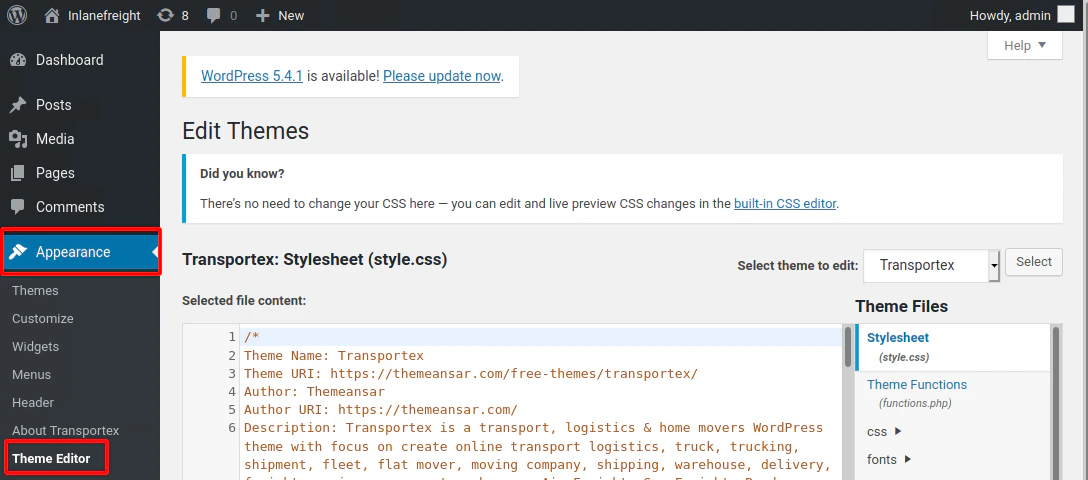
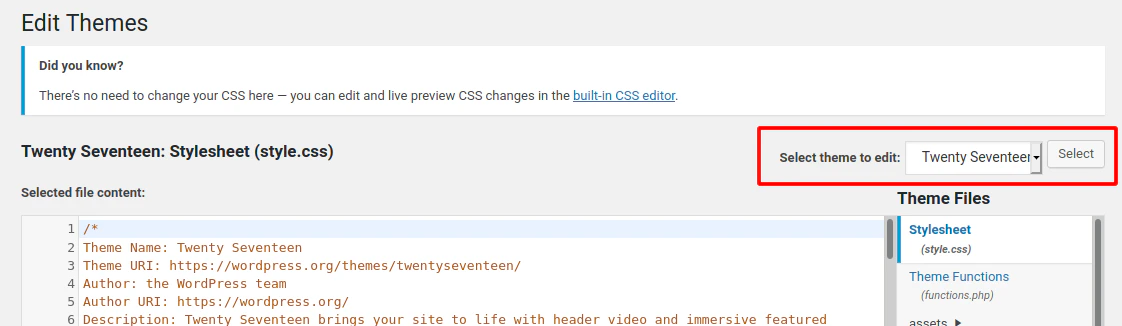
404.php, then add a web shell.
Twenty Seventeen Theme - 404.php
cmd. In this example, we modified 404.php and introduced the system() function. Command execution can then be triggered by appending the cmd parameter to the URL, for example: 404.php?cmd=id.
We can validate code execution by browsing to that URL directly or by issuing the following cURL request.
RCE
Attacking WordPress with Metasploit
Automating WordPress Exploitation
We can use the Metasploit Framework (MSF) to obtain a reverse shell on the target automatically. This requires valid credentials for an account that has sufficient rights to create files on the webserver. To obtain the reverse shell, we can use thewp_admin_shell_upload module. We can easily search for it inside MSF:
MSF Search
0 in the search results represents the ID for the suggested module. From here, we can specify the module by its ID number to save time.
Module Selection
Exploitation
After using theset command to configure the required options, use run to execute the module. If all parameters are correct, it should spawn a reverse shell on the target.
Set Options