
WordPress Core Version Enumeration

You can use several manual methods to discover the installed WordPress version. The fastest starting point is reviewing page source in the browser with View page source (CTRL + U). Then search for the generator meta tag (CTRL + F) or pull the page from CLI and filter with curl and grep.

WP Version - Source Code

...SNIP...
<link
  rel="https://api.w.org/"
  href="http://blog.inlanefreight.com/index.php/wp-json/"
/>
<link
  rel="EditURI"
  type="application/rsd+xml"
  title="RSD"
  href="http://blog.inlanefreight.com/xmlrpc.php?rsd"
/>
<link
  rel="wlwmanifest"
  type="application/wlwmanifest+xml"
  href="http://blog.inlanefreight.com/wp-includes/wlwmanifest.xml"
/>
<meta name="generator" content="WordPress 5.3.3" />
...SNIP...
Dudji@htb[/htb]$ curl -s -X GET http://blog.inlanefreight.com | grep '<meta name="generator"'

<meta name="generator" content="WordPress 5.3.3" />
Aside from version information, source code may also expose useful comments. CSS and JavaScript asset links can also reveal version hints.

WP Version - CSS

...SNIP...
<link
  rel="stylesheet"
  id="bootstrap-css"
  href="http://blog.inlanefreight.com/wp-content/themes/ben_theme/css/bootstrap.css?ver=5.3.3"
  type="text/css"
  media="all"
/>
<link
  rel="stylesheet"
  id="transportex-style-css"
  href="http://blog.inlanefreight.com/wp-content/themes/ben_theme/style.css?ver=5.3.3"
  type="text/css"
  media="all"
/>
<link
  rel="stylesheet"
  id="transportex_color-css"
  href="http://blog.inlanefreight.com/wp-content/themes/ben_theme/css/colors/default.css?ver=5.3.3"
  type="text/css"
  media="all"
/>
<link
  rel="stylesheet"
  id="smartmenus-css"
  href="http://blog.inlanefreight.com/wp-content/themes/ben_theme/css/jquery.smartmenus.bootstrap.css?ver=5.3.3"
  type="text/css"
  media="all"
/>
...SNIP...

WP Version - JS

...SNIP...
<script
  type="text/javascript"
  src="http://blog.inlanefreight.com/wp-includes/js/jquery/jquery.js?ver=1.12.4-wp"
></script>
<script
  type="text/javascript"
  src="http://blog.inlanefreight.com/wp-includes/js/jquery/jquery-migrate.min.js?ver=1.4.1"
></script>
<script
  type="text/javascript"
  src="http://blog.inlanefreight.com/wp-content/plugins/mail-masta/lib/subscriber.js?ver=5.3.3"
></script>
<script
  type="text/javascript"
  src="http://blog.inlanefreight.com/wp-content/plugins/mail-masta/lib/jquery.validationEngine-en.js?ver=5.3.3"
></script>
<script
  type="text/javascript"
  src="http://blog.inlanefreight.com/wp-content/plugins/mail-masta/lib/jquery.validationEngine.js?ver=5.3.3"
></script>
...SNIP...
For older WordPress versions, another common source of version information is the readme.html file in the WordPress root directory.

Plugins and Themes Enumeration

You can find information about installed plugins by reviewing the page source manually or filtering with curl and command-line utilities.

Plugins - Passive Enumeration

Dudji@htb[/htb]$ curl -s -X GET http://blog.inlanefreight.com | sed 's/href=/\n/g' | sed 's/src=/\n/g' | grep 'wp-content/plugins/*' | cut -d"'" -f2

http://blog.inlanefreight.com/wp-content/plugins/wp-google-places-review-slider/public/css/wprev-public_combine.css?ver=6.1
http://blog.inlanefreight.com/wp-content/plugins/mail-masta/lib/subscriber.js?ver=5.3.3
http://blog.inlanefreight.com/wp-content/plugins/mail-masta/lib/jquery.validationEngine-en.js?ver=5.3.3
http://blog.inlanefreight.com/wp-content/plugins/mail-masta/lib/jquery.validationEngine.js?ver=5.3.3
http://blog.inlanefreight.com/wp-content/plugins/wp-google-places-review-slider/public/js/wprev-public-com-min.js?ver=6.1
http://blog.inlanefreight.com/wp-content/plugins/mail-masta/lib/css/mm_frontend.css?ver=5.3.3

Themes - Passive Enumeration

Dudji@htb[/htb]$ curl -s -X GET http://blog.inlanefreight.com | sed 's/href=/\n/g' | sed 's/src=/\n/g' | grep 'themes' | cut -d"'" -f2

http://blog.inlanefreight.com/wp-content/themes/ben_theme/css/bootstrap.css?ver=5.3.3
http://blog.inlanefreight.com/wp-content/themes/ben_theme/style.css?ver=5.3.3
http://blog.inlanefreight.com/wp-content/themes/ben_theme/css/colors/default.css?ver=5.3.3
http://blog.inlanefreight.com/wp-content/themes/ben_theme/css/jquery.smartmenus.bootstrap.css?ver=5.3.3
http://blog.inlanefreight.com/wp-content/themes/ben_theme/css/owl.carousel.css?ver=5.3.3
http://blog.inlanefreight.com/wp-content/themes/ben_theme/css/owl.transitions.css?ver=5.3.3
http://blog.inlanefreight.com/wp-content/themes/ben_theme/css/font-awesome.css?ver=5.3.3
http://blog.inlanefreight.com/wp-content/themes/ben_theme/css/animate.css?ver=5.3.3
http://blog.inlanefreight.com/wp-content/themes/ben_theme/css/magnific-popup.css?ver=5.3.3
http://blog.inlanefreight.com/wp-content/themes/ben_theme/css/bootstrap-progressbar.min.css?ver=5.3.3
http://blog.inlanefreight.com/wp-content/themes/ben_theme/js/navigation.js?ver=5.3.3
http://blog.inlanefreight.com/wp-content/themes/ben_theme/js/bootstrap.min.js?ver=5.3.3
http://blog.inlanefreight.com/wp-content/themes/ben_theme/js/jquery.smartmenus.js?ver=5.3.3
http://blog.inlanefreight.com/wp-content/themes/ben_theme/js/jquery.smartmenus.bootstrap.js?ver=5.3.3
http://blog.inlanefreight.com/wp-content/themes/ben_theme/js/owl.carousel.min.js?ver=5.3.3
background: url("http://blog.inlanefreight.com/wp-content/themes/ben_theme/images/breadcrumb-back.jpg") #50b9ce;
Response headers may also contain version numbers for specific plugins. Not all installed plugins and themes are discoverable passively. To enumerate them actively, send GET requests directly to plugin or theme paths on the server. A 301 redirect confirms the path exists; a 404 means it doesn’t.

Plugins - Active Enumeration

Dudji@htb[/htb]$ curl -I -X GET http://blog.inlanefreight.com/wp-content/plugins/mail-masta

HTTP/1.1 301 Moved Permanently
Date: Wed, 13 May 2020 20:08:23 GMT
Server: Apache/2.4.29 (Ubuntu)
Location: http://blog.inlanefreight.com/wp-content/plugins/mail-masta/
Content-Length: 356
Content-Type: text/html; charset=iso-8859-1
Dudji@htb[/htb]$ curl -I -X GET http://blog.inlanefreight.com/wp-content/plugins/someplugin

HTTP/1.1 404 Not Found
Date: Wed, 13 May 2020 20:08:18 GMT
Server: Apache/2.4.29 (Ubuntu)
Expires: Wed, 11 Jan 1984 05:00:00 GMT
Cache-Control: no-cache, must-revalidate, max-age=0
Link: <http://blog.inlanefreight.com/index.php/wp-json/>; rel="https://api.w.org/"
Transfer-Encoding: chunked
Content-Type: text/html; charset=UTF-8
The same applies to installed themes. To speed up enumeration, use a bash script or a tool such as wfuzz or WPScan to automate the process.

Directory Indexing

Active plugins should not be the only area of focus when assessing a WordPress website. Even if a plugin is deactivated, it may still be accessible, and you can still reach its associated scripts and functions. Deactivating a vulnerable plugin does not improve the security of the WordPress site — it is best practice to either remove or keep up-to-date any unused plugins. The following example shows a disabled plugin. Disabled plugin in WordPress admin Browsing to the plugins directory shows the Mail Masta plugin is still accessible despite being disabled. Mail Masta plugin directory accessible You can also view the directory listing using curl and convert the HTML output into a readable format with html2text.

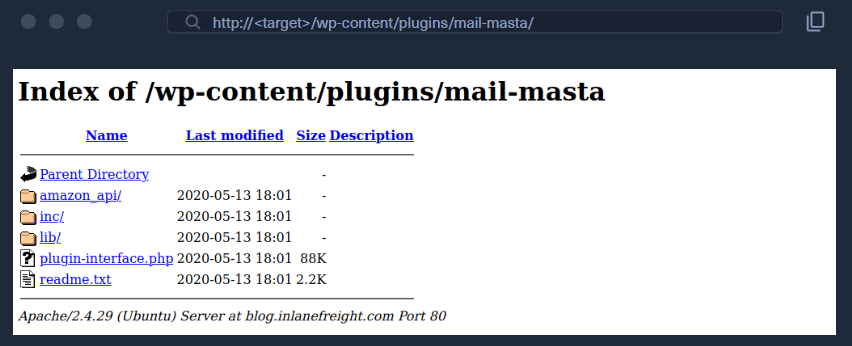
Dudji@htb[/htb]$ curl -s -X GET http://blog.inlanefreight.com/wp-content/plugins/mail-masta/ | html2text

****** Index of /wp-content/plugins/mail-masta ******
[[ICO]]       Name                 Last_modified    Size Description
===========================================================================
[[PARENTDIR]] Parent_Directory                         -
[[DIR]]       amazon_api/          2020-05-13 18:01    -
[[DIR]]       inc/                 2020-05-13 18:01    -
[[DIR]]       lib/                 2020-05-13 18:01    -
[[   ]]       plugin-interface.php 2020-05-13 18:01  88K
[[TXT]]       readme.txt           2020-05-13 18:01 2.2K
===========================================================================
     Apache/2.4.29 (Ubuntu) Server at blog.inlanefreight.com Port 80
This type of access is called Directory Indexing. It allows you to navigate the folder and access files that may contain sensitive information or vulnerable code. It is best practice to disable directory indexing on web servers so an attacker cannot gain direct access to files or folders beyond those required for the website to function.

User Enumeration

There are two methods for performing manual username enumeration.

First Method

Review posts to uncover the user ID and username. Hovering over the post author link reveals the user’s profile URL in the browser’s status bar. Post author link showing admin user The admin user is usually assigned user ID 1. Confirm this by specifying the user ID in the author parameter:
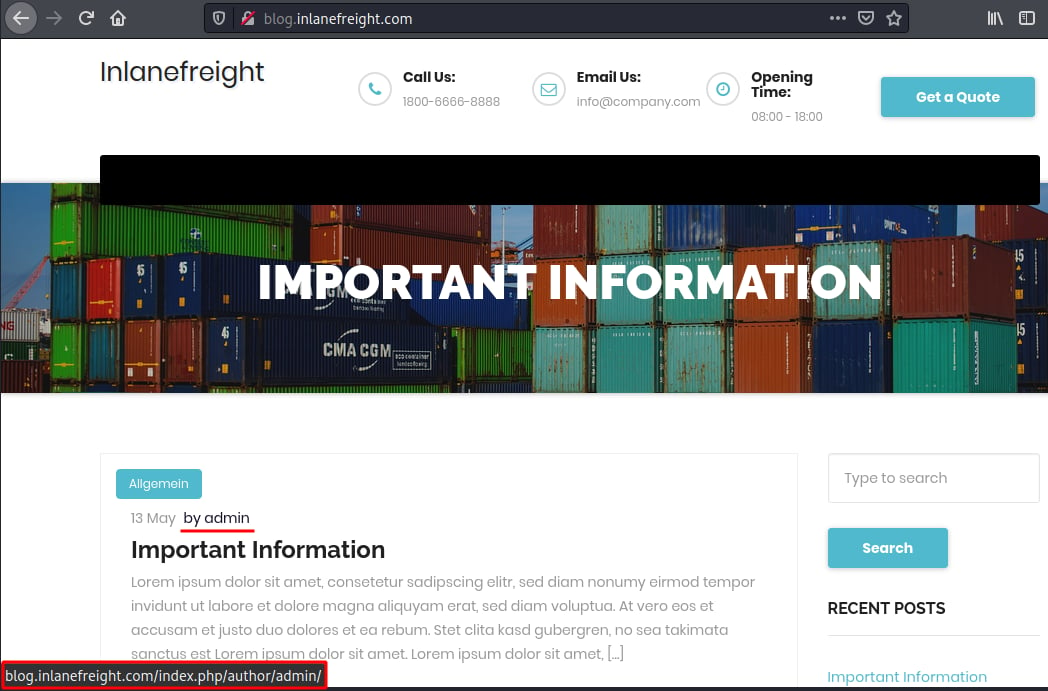
http://blog.inlanefreight.com/?author=1
You can also do this from the command line with curl. The Location header in the response confirms which username belongs to that ID.
Dudji@htb[/htb]$ curl -s -I http://blog.inlanefreight.com/?author=1

HTTP/1.1 301 Moved Permanently
Date: Wed, 13 May 2020 20:47:08 GMT
Server: Apache/2.4.29 (Ubuntu)
X-Redirect-By: WordPress
Location: http://blog.inlanefreight.com/index.php/author/admin/
Content-Length: 0
Content-Type: text/html; charset=UTF-8
If the user ID does not correspond to an existing user, you receive a 404 Not Found response.
Dudji@htb[/htb]$ curl -s -I http://blog.inlanefreight.com/?author=100

HTTP/1.1 404 Not Found
Date: Wed, 13 May 2020 20:47:14 GMT
Server: Apache/2.4.29 (Ubuntu)
Expires: Wed, 11 Jan 1984 05:00:00 GMT
Cache-Control: no-cache, must-revalidate, max-age=0
Link: <http://blog.inlanefreight.com/index.php/wp-json/>; rel="https://api.w.org/"
Transfer-Encoding: chunked
Content-Type: text/html; charset=UTF-8

Second Method

The second method queries the JSON endpoint to retrieve a list of users. From WordPress 4.7.1 onwards, this endpoint only shows whether a user is configured. Before that release, all users who had published a post were returned by default.
Dudji@htb[/htb]$ curl http://blog.inlanefreight.com/wp-json/wp/v2/users | jq

[
  {
    "id": 1,
    "name": "admin",
    "url": "",
    "description": "",
    "link": "http://blog.inlanefreight.com/index.php/author/admin/",
    <SNIP>
  },
  {
    "id": 2,
    "name": "ch4p",
    "url": "",
    "description": "",
    "link": "http://blog.inlanefreight.com/index.php/author/ch4p/",
    <SNIP>
  },
  <SNIP>
]

Login

Once we are armed with a list of valid users, we can mount a password brute-forcing attack to attempt to gain access to the WordPress backend. This attack can be performed via the login page or the xmlrpc.php page. If our POST request against xmlrpc.php contains valid credentials, we will receive the following output:
cURL - POST Request
Dudji@htb[/htb]$ curl -X POST -d "<methodCall><methodName>wp.getUsersBlogs</methodName><params><param><value>admin</value></param><param><value>CORRECT-PASSWORD</value></param></params></methodCall>" http://blog.inlanefreight.com/xmlrpc.php

<?xml version="1.0" encoding="UTF-8"?>
<methodResponse>
  <params>
    <param>
      <value>
      <array><data>
  <value><struct>
  <member><name>isAdmin</name><value><boolean>1</boolean></value></member>
  <member><name>url</name><value><string>http://blog.inlanefreight.com/</string></value></member>
  <member><name>blogid</name><value><string>1</string></value></member>
  <member><name>blogName</name><value><string>Inlanefreight</string></value></member>
  <member><name>xmlrpc</name><value><string>http://blog.inlanefreight.com/xmlrpc.php</string></value></member>
</struct></value>
</data></array>
      </value>
    </param>
  </params>
</methodResponse>
If the credentials are not valid, we will receive a 403 faultCode error.
Invalid Credentials - 403 Forbidden
Dudji@htb[/htb]$ curl -X POST -d "<methodCall><methodName>wp.getUsersBlogs</methodName><params><param><value>admin</value></param><param><value>asdasd</value></param></params></methodCall>" http://blog.inlanefreight.com/xmlrpc.php

<?xml version="1.0" encoding="UTF-8"?>
<methodResponse>
  <fault>
    <value>
      <struct>
        <member>
          <name>faultCode</name>
          <value><int>403</int></value>
        </member>
        <member>
          <name>faultString</name>
          <value><string>Incorrect username or password.</string></value>
        </member>
      </struct>
    </value>
  </fault>
</methodResponse>
These last few sections introduced several methods for performing manual enumeration against a WordPress instance. It is essential to understand manual methods before attempting to use automated tools. While automated tools greatly speed up the penetration testing process, it is our responsibility to understand their impact on the systems we are assessing. A solid understanding of manual enumeration methods will also assist with troubleshooting should any automated tools not function properly or provide unexpected output.

WPScan

WPScan is an automated WordPress scanner and enumeration tool. It determines if the various themes and plugins used by a WordPress site are outdated or vulnerable. It is installed by default on Parrot OS but can also be installed manually with gem.
Dudji@htb[/htb]$ gem install wpscan
We can issue wpscan --hh to verify the installation. This command will show us the usage menu with all of the available command-line switches.
Dudji@htb[/htb]$ wpscan --hh
_______________________________________________________________
         __          _______   _____
         \ \        / /  __ \ / ____|
          \ \  /\  / /| |__) | (___   ___  __ _ _ __ ®
           \ \/  \/ / |  ___/ \___ \ / __|/ _` | '_ \
            \  /\  /  | |     ____) | (__| (_| | | | |
             \/  \/   |_|    |_____/ \___|\__,_|_| |_|

         WordPress Security Scanner by the WPScan Team
                         Version 3.8.1

       @_WPScan_, @ethicalhack3r, @erwan_lr, @firefart
_______________________________________________________________

Usage: wpscan [options]
        --url URL                                 The URL of the blog to scan
                                                  Allowed Protocols: http, https
                                                  Default Protocol if none provided: http
                                                  This option is mandatory unless update or help or hh or version is/are supplied
    -h, --help                                    Display the simple help and exit
        --hh                                      Display the full help and exit
        --version                                 Display the version and exit
        --ignore-main-redirect                    Ignore the main redirect (if any) and scan the target url
    -v, --verbose                                 Verbose mode
        --[no-]banner                             Whether or not to display the banner
                                                  Default: true
        --max-scan-duration SECONDS               Abort the scan if it exceeds the time provided in seconds
    -o, --output FILE                             Output to FILE
    -f, --format FORMAT                           Output results in the format supplied
                                                  Available choices: cli-no-colour, cli-no-color, json, cli
        <SNIP>
There are various enumeration options that can be specified, such as vulnerable plugins, all plugins, user enumeration, and more. It is important to understand all of the options available to us and fine-tune the scanner depending on the goal (i.e., are we just interested to see if the WordPress site is using any vulnerable plugins, do we need to perform a full audit of all aspects of the site or are we just interested in creating a user list to use in a brute force password guessing attack?). WPScan can pull in vulnerability information from external sources to enhance our scans. We can obtain an API token from WPVulnDB, which is used by WPScan to scan for vulnerability and exploit proof of concepts (POC) and reports. The free plan allows up to 50 requests per day. To use the WPVulnDB database, just create an account and copy the API token from the users page. This token can then be supplied to WPScan using the --api-token parameter.

Enumerating a Website with WPScan

The --enumerate flag is used to enumerate various components of the WordPress application such as plugins, themes, and users. By default, WPScan enumerates vulnerable plugins, themes, users, media, and backups. However, specific arguments can be supplied to restrict enumeration to specific components. For example, all plugins can be enumerated using the arguments --enumerate ap.
The default number of threads used is 5, however, this value can be changed using the -t flag.
WPScan Enumeration
Dudji@htb[/htb]$ wpscan --url http://blog.inlanefreight.com --enumerate --api-token Kffr4fdJzy9qVcTk<SNIP>
[+] URL: http://blog.inlanefreight.com/

[+] Headers
|  - Server: Apache/2.4.38 (Debian)
|  - X-Powered-By: PHP/7.3.15
| Found By: Headers (Passive Detection)

[+] XML-RPC seems to be enabled: http://blog.inlanefreight.com/xmlrpc.php
| Found By: Direct Access (Aggressive Detection)
|  - http://codex.wordpress.org/XML-RPC_Pingback_API

[+] The external WP-Cron seems to be enabled: http://blog.inlanefreight.com/wp-cron.php
| Found By: Direct Access (Aggressive Detection)
|  - https://www.iplocation.net/defend-wordpress-from-ddos

[+] WordPress version 5.3.2 identified (Latest, released on 2019-12-18).
| Found By: Rss Generator (Passive Detection)
|  - http://blog.inlanefreight.com/?feed=rss2, <generator>https://wordpress.org/?v=5.3.2</generator>

[+] WordPress theme in use: twentytwenty
| Location: http://blog.inlanefreight.com/wp-content/themes/twentytwenty/
| Readme: http://blog.inlanefreight.com/wp-content/themes/twentytwenty/readme.txt
| [!] The version is out of date, the latest version is 1.2
| Style Name: Twenty Twenty

[+] Enumerating Vulnerable Plugins (via Passive Methods)
[i] Plugin(s) Identified:
[+] mail-masta
| Location: http://blog.inlanefreight.com/wp-content/plugins/mail-masta/
| Latest Version: 1.0 (up to date)
| Found By: Urls In Homepage (Passive Detection)
| [!] 2 vulnerabilities identified:
|
| [!] Title: Mail Masta 1.0 - Unauthenticated Local File Inclusion (LFI)
|      - https://www.exploit-db.com/exploits/40290/
| [!] Title: Mail Masta 1.0 - Multiple SQL Injection
|      - https://wpvulndb.com/vulnerabilities/8740
[+] wp-google-places-review-slider
| [!] 1 vulnerability identified:
| [!] Title: WP Google Review Slider <= 6.1 - Authenticated SQL Injection
|     Reference: https://wpvulndb.com/vulnerabilities/9933

[i] No themes Found.
<SNIP>
[i] No Config Backups Found.
<SNIP>
[i] No Medias Found.

[+] Enumerating Users (via Passive and Aggressive Methods)
<SNIP>
[i] User(s) Identified:
[+] admin
 | Found By: Author Posts - Display Name (Passive Detection)
 | Confirmed By:
 |  Author Id Brute Forcing - Author Pattern (Aggressive Detection)
 |  Login Error Messages (Aggressive Detection)

[+] david
<SNIP>
[+] roger
<SNIP>
WPScan uses various passive and active methods to determine versions and vulnerabilities, as shown in the scan output above.